Human in the loop
Some decisions should not be made by an automation on its own. Human in the loop is how a run pauses, asks a person, and continues with their answer: you automate a process end to end while keeping a person on the one part that needs judgment, such as approving a publish, choosing between drafts an agent produced, or supplying a detail the flow couldn't work out for itself.
How a step pauses
Four kinds of step pause for a person:
- An AI agent asks a question. An AI Agent step with Human in the Loop turned on may stop mid-task to ask something only a person can answer, and carries on with the answer.
- An AI agent asks before a change. With Require Approval for Changes on as well, the agent stops before any tool call that would change something and holds that exact call until a person approves it. Tools the server marks read-only never pause.
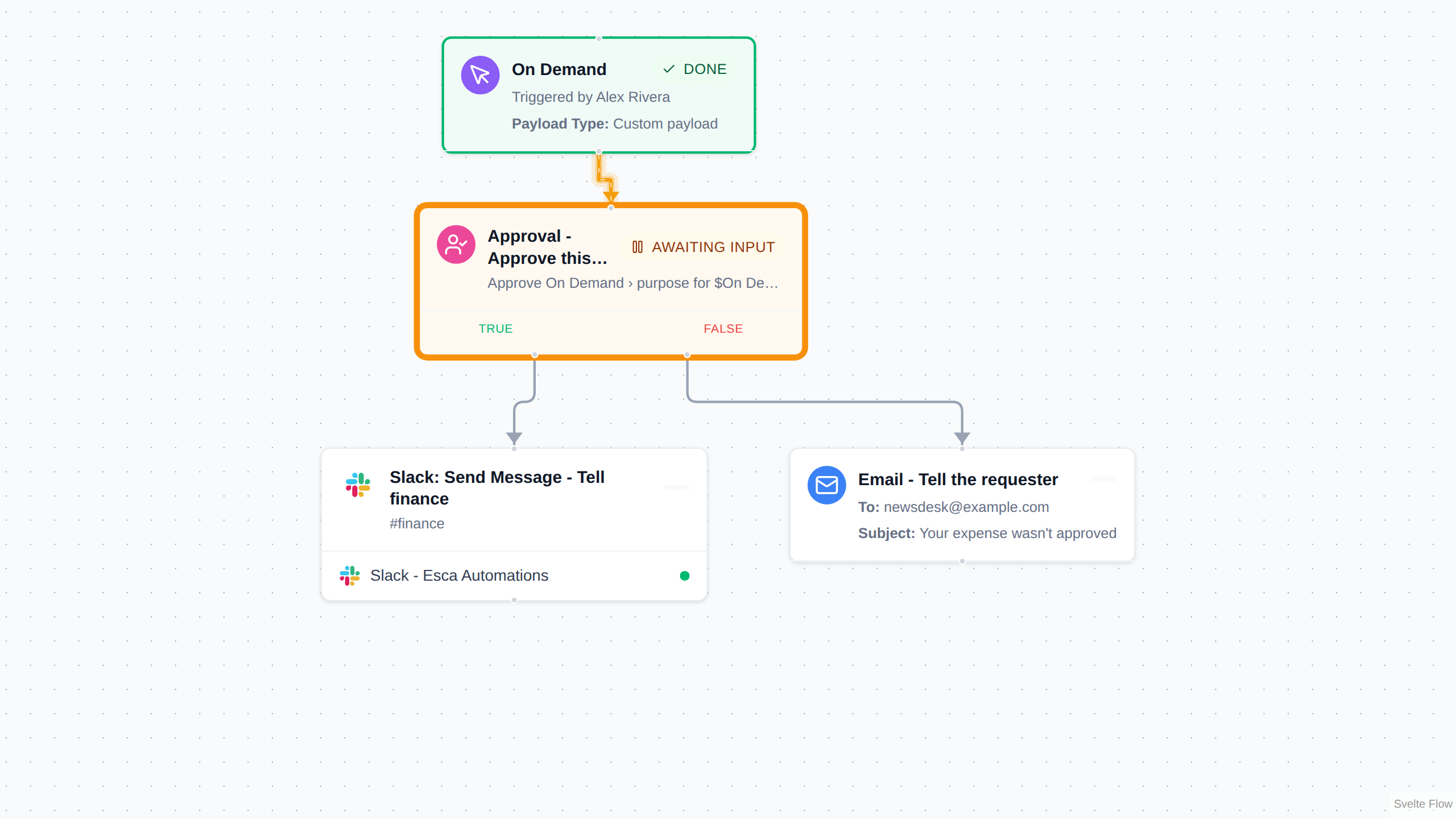
- An Approval step asks for approve or reject. The Approval condition always pauses, and routes down the true or false branch with the answer.
- An On Demand trigger waits mid-flow. An On Demand trigger placed in the middle of a flow holds the run there until a person resumes it, with a form if it has one.
The node shows Awaiting Input on the canvas while it waits, and nothing after it runs. A paused run uses no resources and isn't affected by restarts, so it can safely wait hours or days.
An agent's pause is opt-in, per step. Turn on the step's Human in the Loop setting and choose where its questions go. A step without it never pauses: the agent has to finish on its own, whatever it runs into. Turning it on grants permission rather than forcing a pause; the step pauses only when the work reaches a point that needs a person. Turn on Send Progress Updates to also push the agent's running progress to the same channels, for instance while you get to know a new agent. The full progress is in the run's history either way.
Where a request is answered
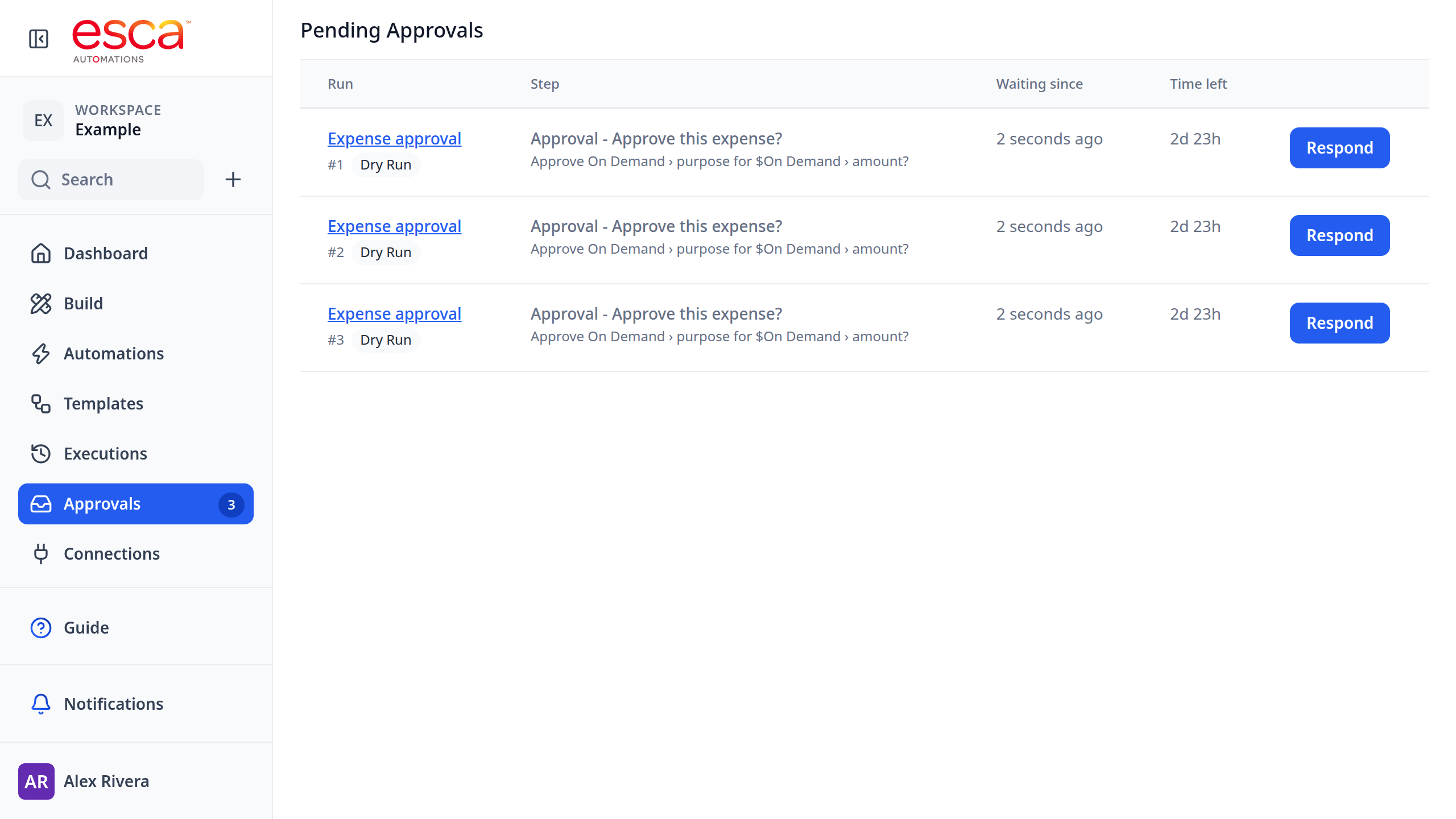
The Approvals page lists every request waiting on a person across every automation: the run, named by its automation, the step, how long it has waited and how long it has left, with a Respond button that opens the answer form. It is always there, whatever channels a step was given, so a request is never unanswerable because a chat integration was misconfigured or a message deleted. Anyone with the Approve capability, an Operator or above, can answer.
An AI agent's questions and an Approval step's requests can also be delivered to a chat channel, where a person answers without leaving the conversation:
- Slack
- Microsoft Teams
The request arrives as an interactive message carrying the question and controls shaped to it: a yes-or-no, a choice among options, or a small form. Submitting it resumes the run. The Slack connection needs interactivity set up first; until then the message still posts, but it is answered on the Approvals page.
The request arrives as an interactive card with the same controls, and the card updates once it is answered. The Teams connection needs a public messaging endpoint set up first; until then the card still posts, but it is answered on the Approvals page.
Picking no channel is also fine: the request still pauses the run and is answered on the Approvals page. A request sent to several places is resolved everywhere as soon as one person answers it, so nobody answers twice.
Getting notified
Subscribe to the Automation Approval notification from your profile's notification settings to be told in the CMS whenever a run pauses for a person, for every automation or only the ones you name. It links to the Approvals page. A second subscription, Automation Approval Reminder, reminds you as a request's deadline approaches, on a lead-time schedule such as two days and 12 hours before. Left unset, it follows the schedule on the Settings page's Approval Reminders if there is one; set your own and it replaces that for you. Dry runs never notify anyone.
Waiting does not go on forever
A paused step waits at most the Awaiting Input Timeout, 72 hours unless an Admin changes it on the Settings page. A request nobody answers in time fails the step, and the run then behaves as it would for any other failure: following an error path if one is wired, ending as Errored if not. The run's history keeps the question, that nobody answered it, and when it expired.
This timeout is separate from the limits on how long a run may spend working. Time spent waiting for a person counts against neither the execution budget nor anything else.