Mappings
A mapping takes one value, reshapes it, and gives it a name a step can use. Say a Slack message should read "Published Sep 18" when an article goes live: the Content trigger's publish date arrives as a timestamp, so a mapping on the Slack step's Input tab takes that date as its Source, passes it through a Date & Time transform with the pattern MMM d, and names the result publishDate. The message field then reads publishDate like any other value.
Each mapping lives on a step's Input or Output tab. An input mapping is worked out before the step runs, so the step reads the value under that name; an output mapping is worked out after the step completes, so later steps read it from the step's output. A mapping's transforms run in order, each working on what the one before it produced. How a step uses each kind is covered in Actions.
When to use a mapping. Most fields accept a value straight from the variable picker, and that is the right choice whenever the value is already in the form the field needs. Reach for a mapping when the value has to change on the way (a date formatted, a label looked up, a list joined, a default supplied), when a step needs data it has no field for (most often a Script step, which reads its input mappings as input), or when several steps need the same reshaped value, which an output mapping on the step that produces it gives them all at once.
- Sources: where a mapping's value comes from, with a table to choose by.
- Transforms: what each transform does, one page per transform, and how a short chain of them reshapes a value.
A mapping left unnamed takes the name its source implies, such as headline for a reference to content/headline, shown as the Field Name's placeholder until it is saved. See Sources.
How the variable picker shows a mapping's type
The variable picker shows an output mapping as the type its source and transforms can state. A Path Extraction source carries the shape of what it picked from a run, a String Template is text, and a Convert or a Number states the type it produces. A mapping whose type can't be stated, such as a Variable Reference passed on as it is or a mapping ending in a Script, is offered by name without a type, and later steps take its value whole. The Sources page says what each source gives the picker; see Path Extraction.
The trace
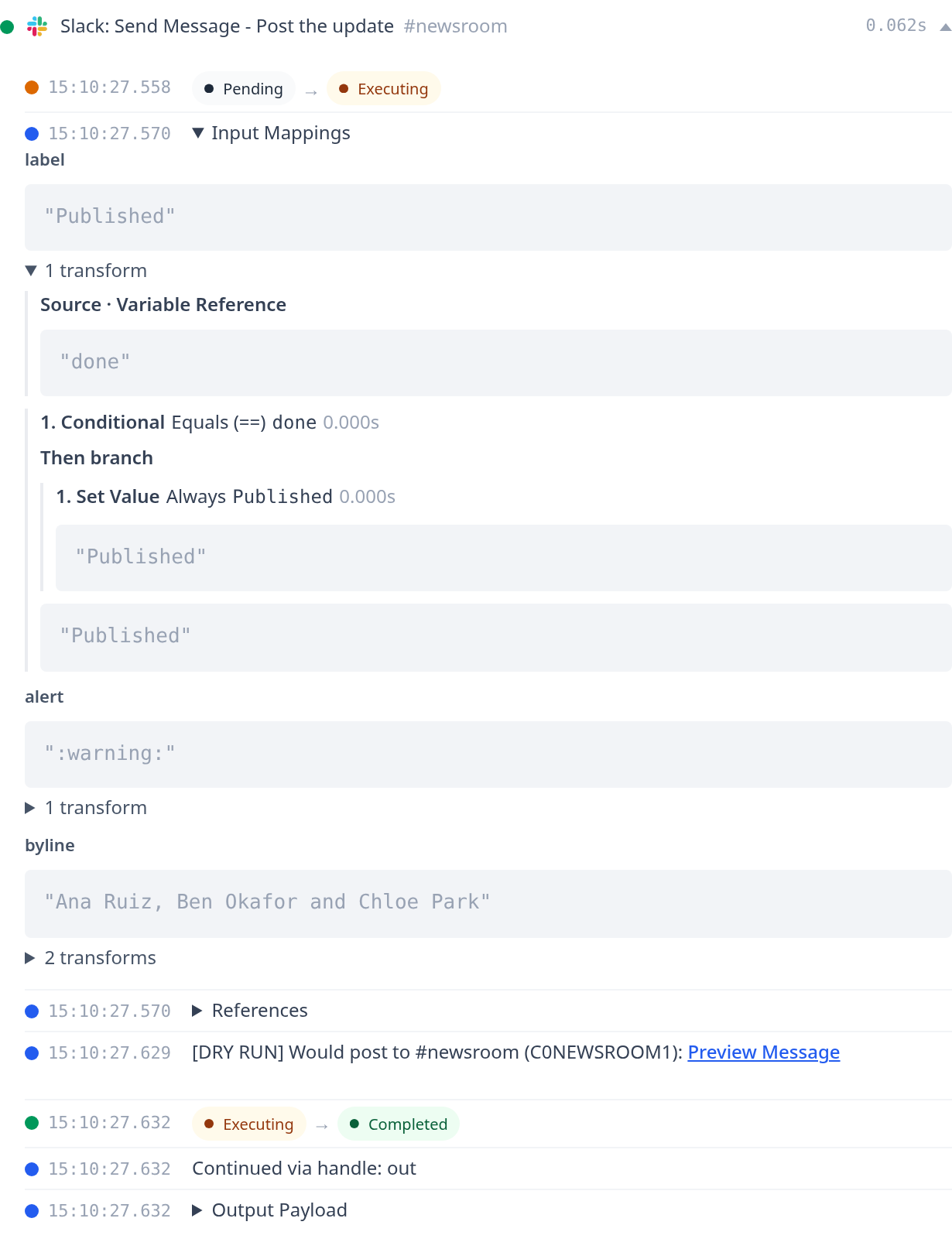
In a run, every mapping that has transforms shows how its value was worked out: what the source resolved, then what each transform produced, in order. A transform that failed is flagged before the mapping is expanded. The trace is part of a step's output view; see Logs and output.
When a transform fails
A transform that can't produce a value, such as a Date & Time given text that isn't a date, fails the step, and the mapping's trace shows which transform failed and why. See Failure, retry, and the error path.