Sources
A mapping's Source is where its value comes from. The same five sources are offered on a step's Input and Output tabs; what differs is what each can see. An input mapping's source reads the steps before this one, along with the variables, secrets and run context every field can reach. An output mapping's source reads this step's own output as well, which is how an output mapping lifts a value out of what the step just produced. The fields of each source are described in the Reference, in the same words their Guide icons show in the tool.
| Source | What you get | Use it when |
|---|---|---|
| Variable Reference | One value from the variable picker, with its type kept | The usual choice: a field of the trigger's data or an earlier step's output, a variable, a secret, or Now |
| Node Output | An earlier step's whole output | The output has no declared shape, or a Script step should receive the object whole |
| String Template | Text with values dropped into it | The mixed text has to be a value of its own, such as a Webhook Response body |
| Path Extraction | A field inside output the step couldn't describe in advance, such as an HTTP response's JSON | The variable picker doesn't list the field you want |
| First Available | The first of several values that has one | A step after two branches rejoin needs a value either branch could have produced |
A mapping with no source starts from the value already in hand: for an input mapping, the output of the step immediately before; for an output mapping, this step's own output. Give it transforms, and they work on that.
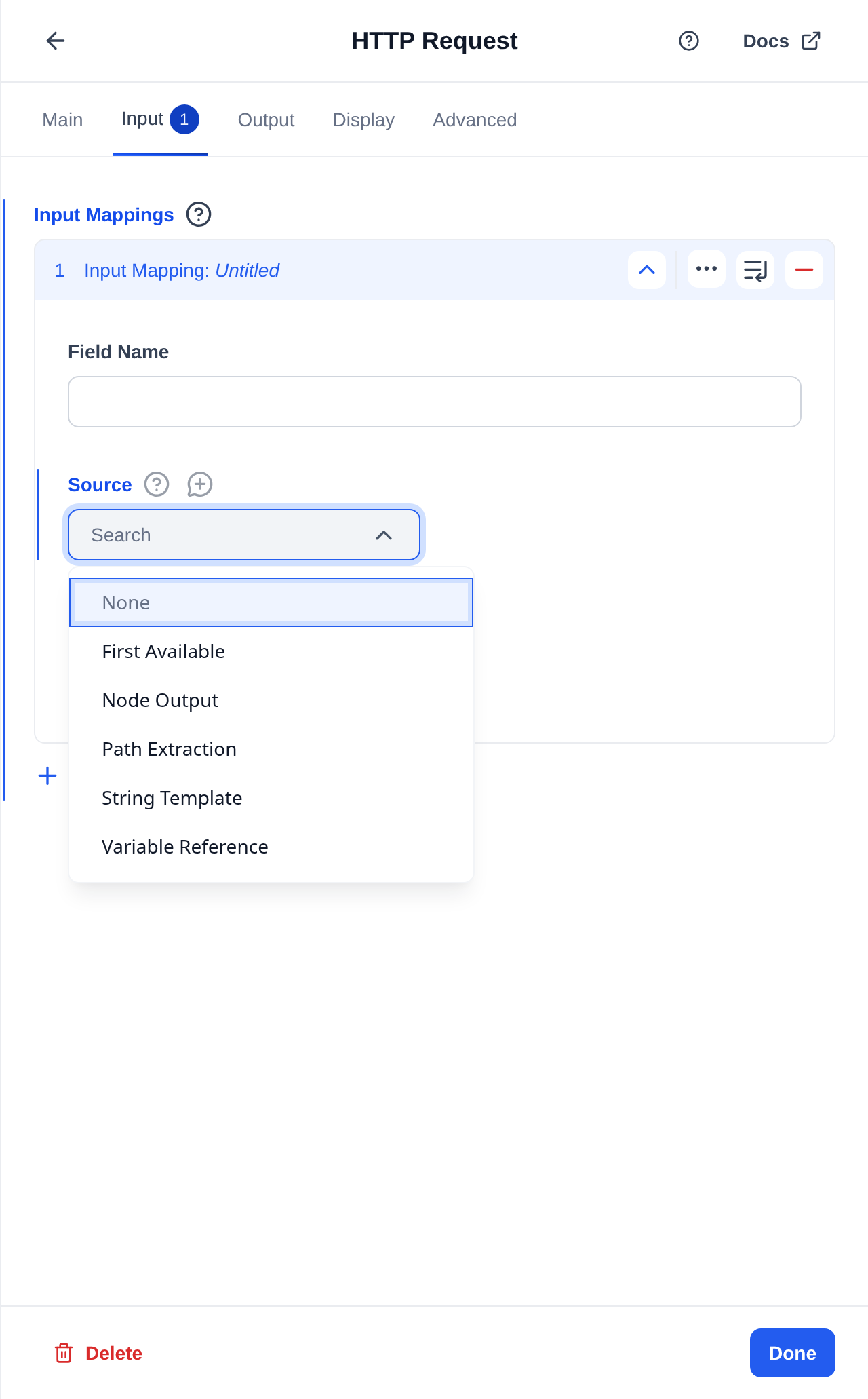
A mapping's Field Name is what later steps and the step's own fields know its value by. Leave it blank and the mapping takes the name its source implies, shown as the field's placeholder: a reference to content/headline implies headline, and a path ending in summary implies summary. The name is taken once, when the mapping is saved, and stays as it was if the source is changed afterwards, since steps after this one may already refer to it. Node Output and String Template imply no name, so a mapping with either has to be named.
Variable Reference
One value picked in the variable picker: a field of the trigger's data or of an earlier step's output, a variable, a secret, or something the run knows about itself, such as Now. The value keeps its type, so a number stays a number and an object stays an object, where a text field holding the same reference would write it as text.
A mapping sourced from a secret is traced without its values, and an input mapping's value is recorded on the run as a redaction mark, so the secret never sits on the run in clear. The mapping implies the name of the field it references.
Node Output
The whole output of one earlier step, as that step produced it: an object, a list or a single value, with its type kept. The picker lists each step in scope by name.
Use it where a field of the output isn't enough or can't be named: a step whose output has no declared shape, such as a Script with no output type, or an object a later Script step should receive whole. An Extract Path transform after it reaches a field inside.
String Template
Text, with references dropped in where values should go, such as Issue followed by a key reference, a colon, and a summary reference. The template is resolved as a field is, each reference replaced by its value, and the result is always text, whatever the values were.
A field that takes text can already mix text and references, so a template is for when the mixed text needs to be a value of its own: handed to a Script step as a field of input, passed through transforms, or, as an output mapping, published to every step after this one. A Webhook Response's body built from several values is the usual case.
Path Extraction
A value reached inside a step's output by a slash-separated Path, such as json/questions or fields/assignee/displayName. It is how you reach the fields of an output the step can't declare in advance, such as an HTTP response's JSON body.
On the Input tab, Node chooses the step whose output the path reads into; leave it empty for the step immediately before. On the Output tab, the path reads into this step's own output. Either way the Path field lists the paths found in one of that step's runs, so run the automation once and pick the path rather than typing it from memory.
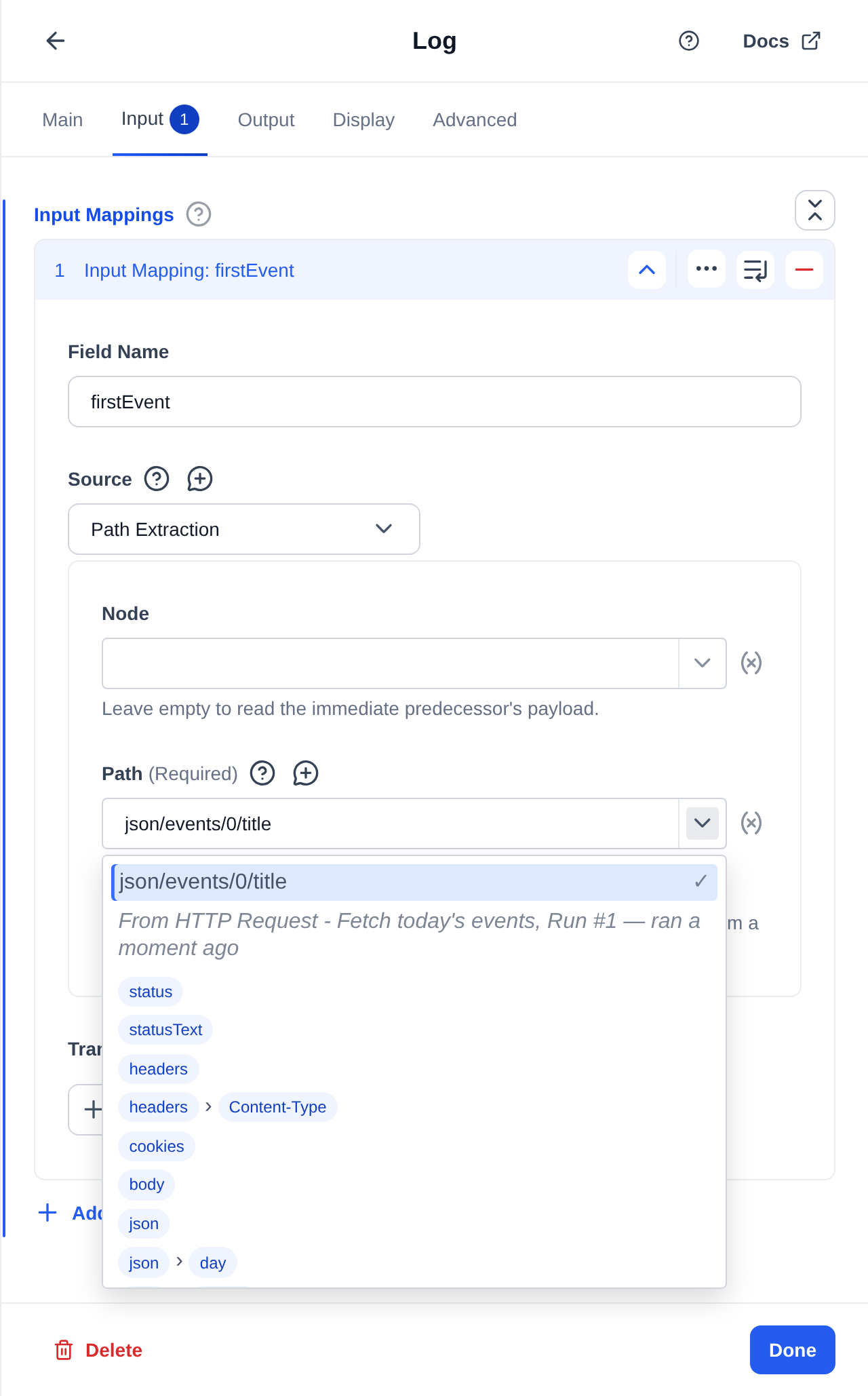
Each segment names a field of an object; a number picks an item of a list, counted from 0, so items/0/name is the first item's name. A field name applied to a list reads it from the list's first item. A path that reaches nothing produces null. The mapping implies the last segment of its path as its name.
Path Extraction (this source) reaches into a step's output. The Extract Path transform reaches into a value the mapping already has, such as an object a Convert parsed from JSON. Both count list positions from 0; a List transform's Pick Item counts from 1.
How a picked path gives the mapping a shape
When you pick a path, or type one, the mapping takes the shape of the value at that path in the run the list came from: field names and types, at most 50 fields and 4 levels deep, nearest the top first. Later steps can then pick inside the mapped value, and a Loop over a list it maps offers each item's fields. The note under Path names the run the shape came from. Later runs don't change it; pick the path again to retake it. A path set before the step has run has no shape, and the note says so; its value is offered whole until one is taken. This is the one source that gives its mapping a type from a run.
First Available
A list of Variables, tried in order; the mapping's value is the first that isn't null. A step that didn't run, such as one on the branch of a condition that wasn't taken, has no value, so its variables are passed over. Where several did run, the order is the priority.
It is how a step after two branches rejoin reads a value that either branch could have produced, such as the ID of the content one branch created and the other updated. As an output mapping on the rejoining step, it names the value once for every step after it; as an input mapping, it is local to that step and would have to be repeated on each step that needs the value.
The test is for null, not for emptiness: a branch that ran and produced 0, empty text or false produced a value, and that value is used. The mapping implies a name only when every variable in the list implies the same one, such as the id of each branch's content.
Related
- Mappings: what a mapping is, how its value is worked out in a run, and what happens when a transform fails.
- Transforms: what reshapes the sourced value, one page per transform.
- Variables and secrets: what the variable picker offers, and how a reference resolves.