Scripts
Every role can browse the catalog; a Builder or above creates, changes and archives scripts.
Your catalog of saved scripts. A saved script is a script kept under a name of its own, so any number of Script steps can reference it instead of each carrying a copy. This page is where saved scripts are created, found, edited and archived, and where a script kept in a git repository or a gist is pulled and pushed. For how a step uses one, see Where the script comes from.
A step's reference to a saved script is live: a change here reaches every step that uses the script on its next run. Check Used by before editing.
The table
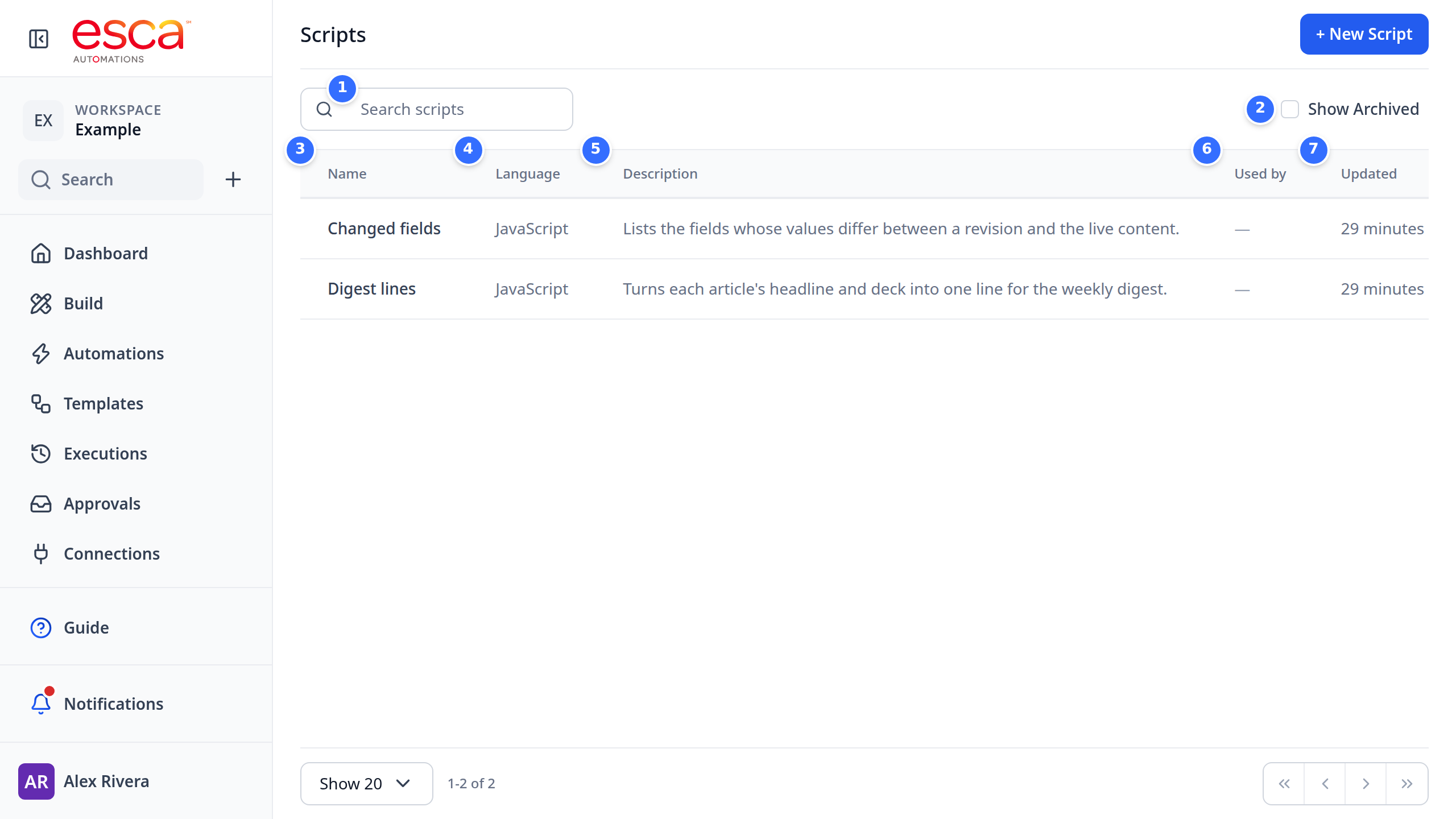
- Search scripts: searches names, descriptions and the code itself.
- Show Archived: includes archived scripts, which are hidden by default and never offered to a step's picker.
- Name: scripts are listed by name, a page at a time.
- Language: the language the script is written in.
- Description: what the script is for.
- Used by: how many automations use it, revisions and archived automations included.
- Updated: when it was last saved.
Archiving behaves differently for the three shared things an automation references:
| Archived | Restored | |
|---|---|---|
| Script | Steps already using it keep running it; it is no longer offered to new ones. | Offered again. |
| Agent | Steps using it fail until it is restored. | Steps run again. |
| Connection | Steps fail and events are refused. | Actions work again; triggers stay silent until their automations are saved again. |
A script that an automation references cannot be deleted; the form says which ones. Archive it instead, or change those automations first.
Creating a script
+ New Script opens an empty form; the Script reference describes each field. You can also create a script from a Script step's own editor with Save to Scripts…, which opens this form with the step's code in place; see Moving code between a step and the catalog. Above a saved script's form, a note lists the automations that use it, each linking to its editor.
Keeping a script in a repository or a gist
A saved script can be kept in step with a file elsewhere: a path on a branch of a git repository, or a file in a GitHub gist, through a GitHub connection. Set Kept in on the form, save, and the form gains a panel naming the file with three actions. The fields of the two kinds are described under Repository file and Gist / Snippet in the Script reference.

- Pull replaces this script's code with the file's and records the sync. If the code here has changed since the last sync, the panel asks first.
- Push writes this script's code to the file as one commit, with the Message you type or
Update <name>, and records the sync. For a gist that does not exist yet, Push creates it. - Check remote asks whether the file has changed since the last sync, without changing anything.
The status line says where the script stands: never synced, in step as of a moment, or changed here since the last sync. A step always runs whatever the catalog holds; pulling is how a change arrives. A push is refused when the file has changed on the host since the last pull, or when it exists but was never pulled, since nothing is known about what would be overwritten. Pull first, then push.
A gist cannot refuse a write over a file that has changed since your last pull, so the engine checks the file just before writing. A change that lands in the moment between the check and the write is overwritten.
Moving code between a step and the catalog
A Script step whose source is Inline offers two links under its editor:
- Insert from Scripts… copies a saved script's code into the step's editor, replacing what was there after asking. It is a copy: the step does not follow later edits. To follow them, switch the step's source to Saved and pick the script instead.
- Save to Scripts… opens the new-script form with the step's code. Name it and save; the step is unchanged, and the script is in the catalog for any step to reference.
Scripts kept elsewhere
Files in places the engine has no connection to, such as Amazon S3, are not part of this catalog. Fetch the file with a step that can reach it, such as an HTTP Request or a GitHub Get File Contents action, and give the Script step a Runtime source bound to that step's output. See Where the script comes from.