Content Query action
Lists the records that match a query, for a flow to work through. In the action picker it is Content Query, under General Actions. Wire its results output into a loop to process every match. With no connection it lists this workspace's records; with a Brightspot connection it lists content in that CMS, by a query built here or by one of the CMS's saved work streams.
It only reads, so it runs unchanged under a dry run and previews the real result set.
Fields
| Field | Required | Description |
|---|---|---|
| Connection | No | Where the records live: this workspace's records, or a connected CMS through a Brightspot connection. See Workspace records or a connected CMS. |
| Site | No | For a Brightspot connection only: the site to query. |
| Source | Yes | Which records: Custom Query everywhere, or Work Stream with a Brightspot connection. |
| Max Results | No | How many records to return at most. 100 when unset; 1,000 is the most allowed. See the note below. |
| Skip | No | How many matching records to skip before the first returned one, for paging through a large set. |
| Sort By | No | The field to order results by. The picker lists the type's queryable fields plus the publish and update dates. |
| Sort Order | No | Ascending or Descending. Ascending when unset. |
| Include Field Values | No | Return each record's field values beside its summary, so a loop body can read them without a Content Fetch per item. |
A loop over a Content Query sees only the first page: 100 records unless Max Results says otherwise, and never more than 1,000. The output's truncated says whether more matched, and totalCount how many. To work through a larger set, run the automation on a schedule with Skip advanced each time, or narrow the query so each run handles a slice.
Custom Query
| Field | Required | Description |
|---|---|---|
| Content Type | Yes | The type to list. |
| Predicate | No | How to narrow the type: Match Fields or Query Expression. Unset matches every record of the type. |
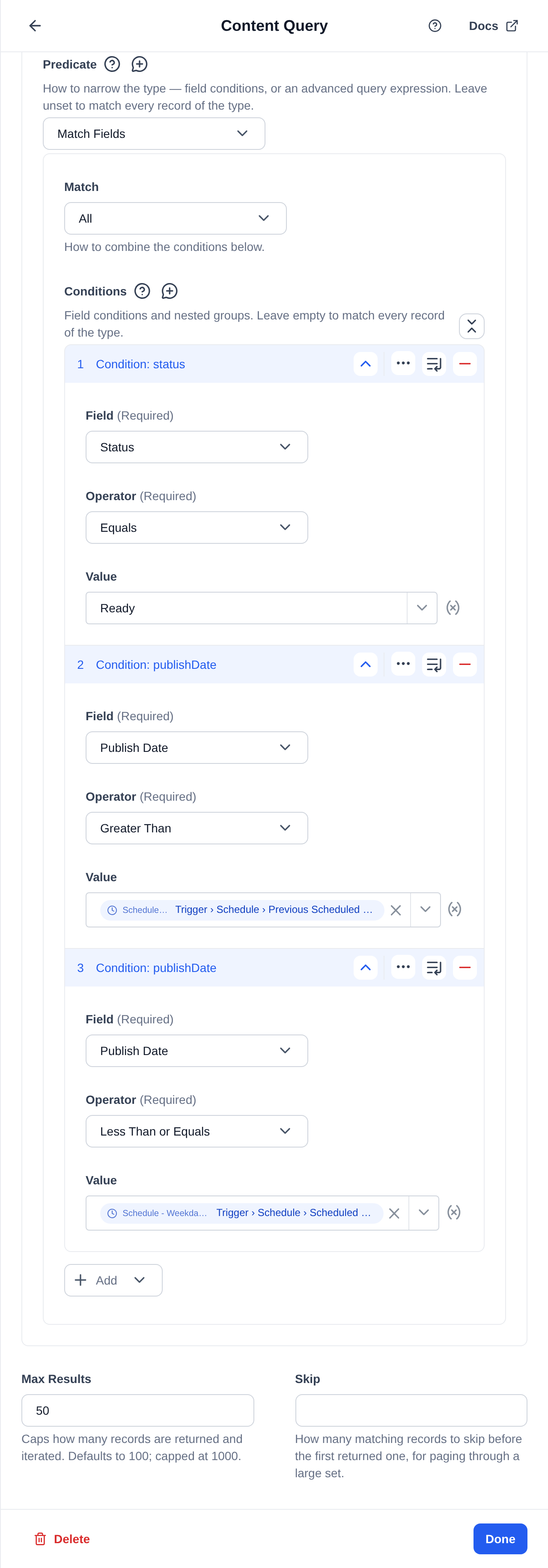
Match Fields builds the filter from conditions in the editor. Match says how to combine them (All, Any or None), and Conditions holds Condition rows (a field, an operator and a value that accepts variables) and nested Groups with their own Match. For example, "Articles whose Status is Ready and whose publish date is in the last seven days" is Match All with two conditions: Status Equals Ready, and Publish Date Greater Than a date mapped in from an earlier step. The field picker lists the fields the type can be queried on: in a workspace, the record id and every field its content type marks Unique or Search Filter.
Query Expression, for developers
Query Expression is a raw query in Brightspot's predicate language, with ? placeholders and a list of Values that fill them in order, for what the builder can't express: an operator outside its list, or and, or and not combined with grouping. For example, headline contains ? and (cms.content.publishDate > ? or featured = ?) with three values. It supports positional binding such as ?0 and ?1, and keywords such as missing. A note warns when the count of values doesn't match the placeholders.
A condition naming a field the type can't be queried on, an operator outside the picker's list, a Query Expression that doesn't parse, or a Sort By field the type can't be queried on is flagged on the step's card before a run, naming what to change. Which fields a connected CMS can query is known only to it, so a field is checked there when the step runs.
Work Stream
With a Brightspot connection, Source can be one of the CMS's work streams: a saved list of content that tracks which items have been dealt with, the way an editor works through an assignment queue.
| Field | Required | Description |
|---|---|---|
| Work Stream | Yes | The work stream to run across. |
| Include Completed | No | By default only items not yet completed are returned, so a re-run picks up where the last one left off. Turn it on to return every item. |
Pair a Work Stream source with a Content Edit Complete Work Stream Item inside the loop, and each run works through what the last one left. With the automation on a Schedule, a large backlog gets done a page at a time without any run doing more than Max Results items.
Output
| Field | Description |
|---|---|
results | The page of matches. Each carries contentId, contentTypeId, contentTypeName and label, plus values when Include Field Values is on: every field of the content type, null where the record leaves one unset. |
totalCount | How many records matched in all. |
truncated | Whether matches remain beyond this page. |
With a Work Stream source, the output also identifies the work stream, so a later Complete Work Stream Item can reference it.
A Brightspot connection whose server module predates a setting reports on the node which settings it would ignore, so you know before a run.