Content Fetch action
Reads one record, by id or by a field the type uses as a unique key such as a slug or an external id. In the action picker it is Content Fetch, under General Actions. With no connection it reads this workspace's records; with a Brightspot connection, content in that CMS.
Fields
| Field | Required | Description |
|---|---|---|
| Connection | No | Where the record lives: this workspace's records, or a connected CMS through a Brightspot connection. See Workspace records or a connected CMS. |
| Site | No | For a Brightspot connection only: the site to read from. |
| Content Type | Depends | Required to fetch by any field other than the id. Optional when fetching by id, where it rejects records of any other type. |
| Lookup Field | No | The field to match on. Blank fetches by content id; pick a unique field, such as a slug or an external id, to fetch by that instead. |
| Lookup Value | Yes | The value to match: a content id when Lookup Field is blank. Accepts variables. |
| Revision | No | One of the content's unpublished revisions or past versions to read instead of the content as it stands, usually bound to a trigger's Revision › ID. Blank, shown as Current, reads live content, or the draft if it was never published. A workspace record has versions only. |
What happens when nothing matches
Not finding a record is treated differently depending on how you looked it up. An id names a record that is supposed to exist, so a fetch by id that finds nothing fails the step. A fetch by any other field that finds nothing is a normal result: the step completes with found false, so a later step can create what is missing.
| Lookup by | Nothing found | More than one found |
|---|---|---|
| Content id | The step fails. | Can't happen; ids are unique. |
| A unique field | found is false and the run continues. | The step fails, since the field was supposed to be unique. Use Content Query when you want every match. |
Output
| Field | Description |
|---|---|
found | Whether a record matched. |
contentId, contentTypeId, contentTypeName, label | The record's identity, when found. |
values | The record's field values, when found: those of the revision or version read. A field the record leaves unset is there as null. In a workspace the fields are declared by name, so later steps can pick them. |
revision | Which revision the values are: its kind (Live, Draft, Revision or Version), id, name, status, workflow state, schedule, who saved it and when, and previousVersionId, the version saved before it, which a Content Compare can compare against. See Revisions. |
pendingRevisions | The content's unpublished revisions, newest first, each described the same way, so a flow can tell whether the content has work waiting to be published without a separate step. Revisions of variations and archived revisions are left out. |
Bound to a trigger's Revision › ID, a fetch follows what the editor or the event was on: a revision's values when there is one, and live when the trigger fired on live content. A revision's values are live with the revision's changes merged, which is what the content will be once it publishes.
Updating or creating without a branch
Say articles arrive from an outside system with a slug, and each should update the existing article or create a new one. To "upsert" (update it if it exists, create it if it doesn't) takes three steps and no condition:
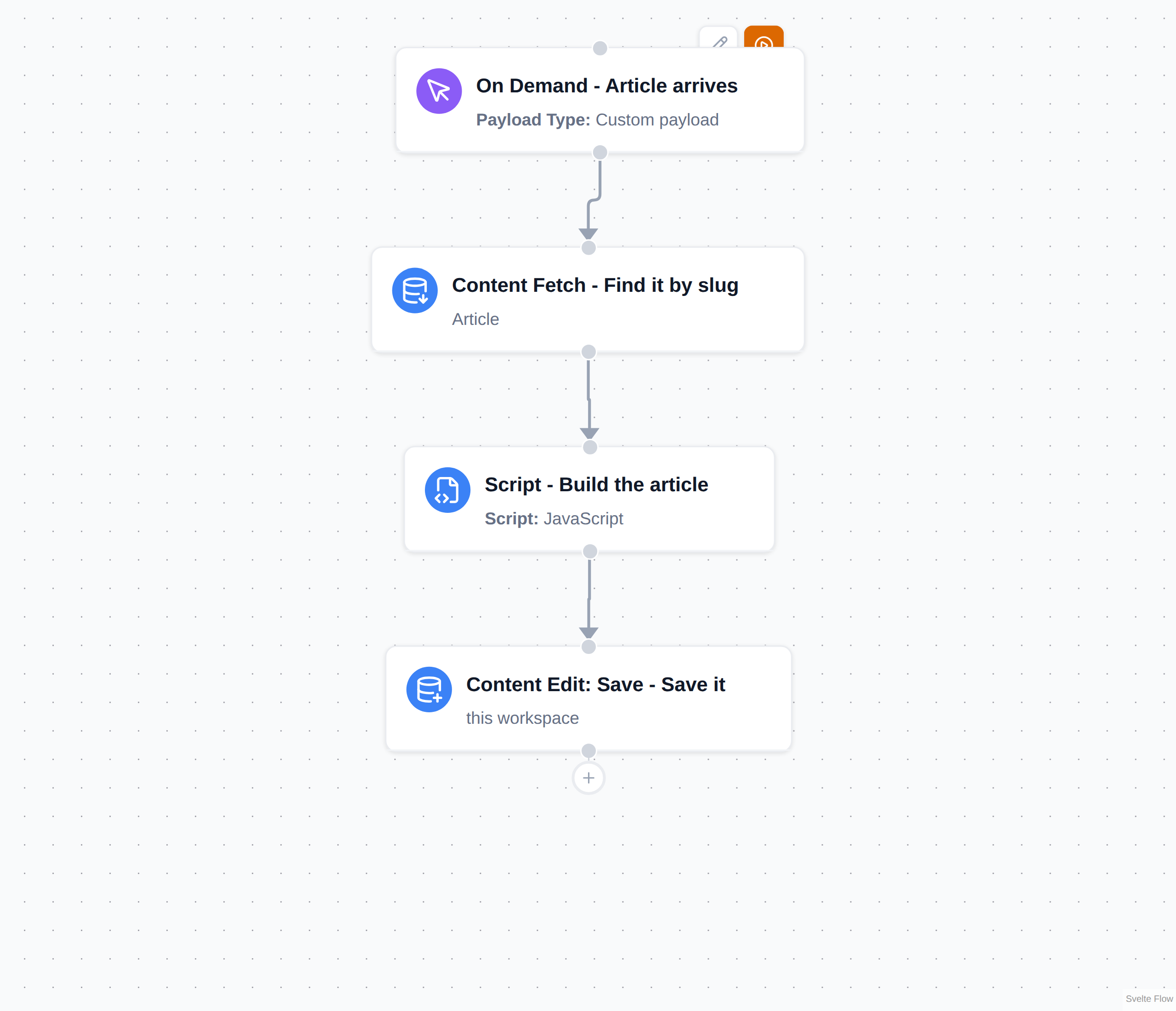
The same three nodes cover content that exists and content that doesn't, so there are no two paths to keep in step. See the Save rules on Content Edit.