Content Edit action
Saves, publishes, archives or deletes one record. In the action picker it is Content Edit, under General Actions. With no connection it acts on this workspace's records; with a Brightspot connection it acts on content in that CMS, where it also offers the CMS's own operations such as Publish and Transition.
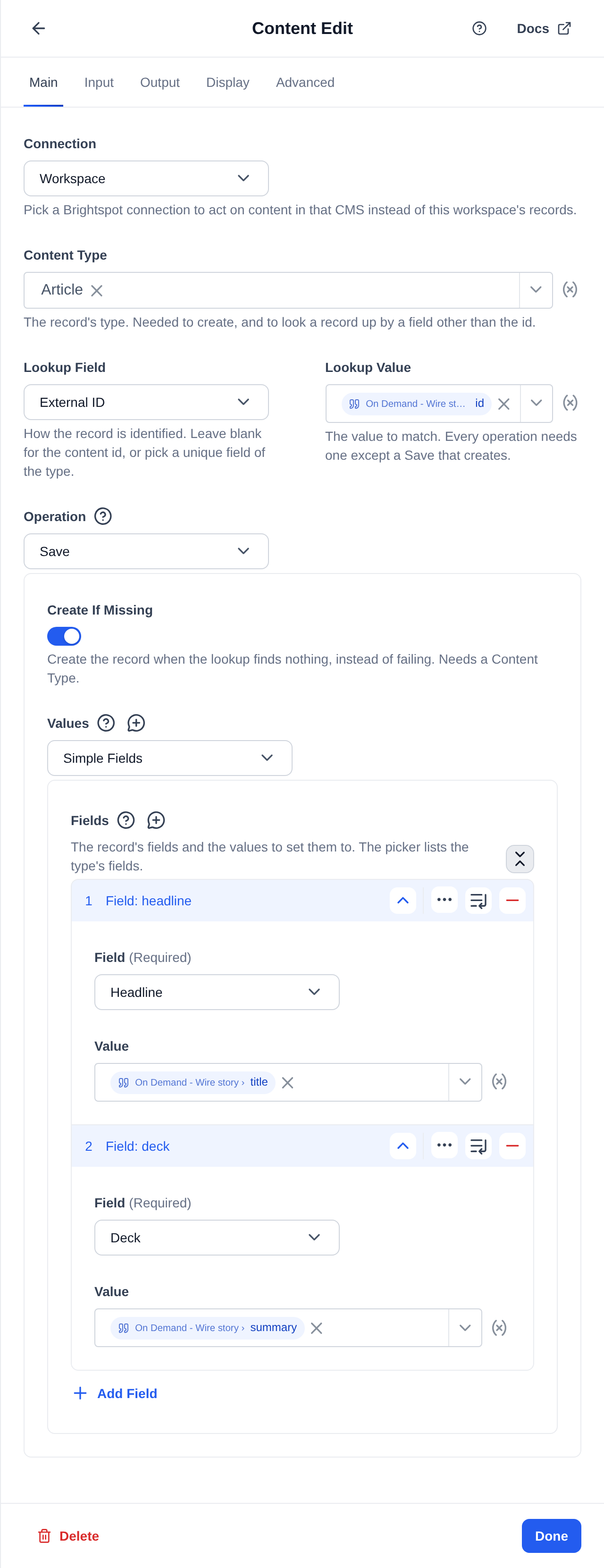
Fields
| Field | Required | Description |
|---|---|---|
| Connection | No | Where the record lives: this workspace's records, or a connected CMS through a Brightspot connection. See Workspace records or a connected CMS. |
| Site | No | For a Brightspot connection only: the site to act on. |
| Content Type | Depends | The record's type. Needed to create a record, and to look one up by any field other than the id. |
| Lookup Field | No | How the record is found. Blank means by its id; or pick one of the type's unique fields, such as a slug or an external id. |
| Lookup Value | Depends | The value the lookup field must equal, usually bound to an earlier step's content id. Every operation needs one except a Save that creates. A variable here that resolves to nothing fails the step rather than being read as a request to create. |
| Revision | No | For a Brightspot connection, and for Save, Publish, Transition and Delete: one of the content's unpublished revisions to act on instead of the content itself, usually bound to a trigger's Revision › ID. Blank acts on the content as it stands. See Revisions. |
| Operation | Yes | What to do. The workspace offers Save, Delete, Archive and Restore; a Brightspot connection adds Publish, Transition, Post Comment and Complete Work Stream Item. |
Finding the record works as it does on Content Fetch: by id unless you pick a unique field. A lookup that finds nothing fails the step for every operation but a Save with Create If Missing.
Save
Creates or updates a record. Which one it does follows from the fields you set:
| Lookup Value | Content Type | Create If Missing | What Save does |
|---|---|---|---|
| set | — | off | Updates the record it names. Fails when there is none. |
| empty | set | off | Creates a new record. |
| set | set | on | Updates the record, or creates it when there is none, so the next lookup finds it. |
The third row is an upsert: one Save that copes with a record that may or may not exist yet, such as a tag reused when it is already there, or a sync from an outside system that is re-run. It is opt-in, so a Save you already have keeps updating only.
Want a person to review changes before they go live? Turn on Keep Live Unchanged, offered for a Brightspot connection. Changes to live content are saved as a new revision instead of being published, so live stays as it is until someone publishes the revision. Revision Name names that revision, and a later Save with the same name updates it instead of starting another, so an automation that runs every night refines one revision rather than stacking up new ones.
Values is where the record's values come from.
- Simple Fields
- Differences (for script authors)
One row per top-level field, each with a value that accepts variables. The field picker lists the type's plain fields: text, true/false, numbers, dates and times, and lists of those. Right for updating a headline, setting a status or filling in a date.
A field that holds another record (a reference, an embedded object, rich text, a file) can't be set here; use Differences.
A variable holding the changes as a Script step builds them with dari, which knows the content model and so handles embedded objects, references and rich text. The field takes a variable, not typed JSON, and the picker offers only objects, so set the Script's Output Type to an Object with no fields or take its shape from a run that returned the map. Before saving, the step checks the value is shaped as changes keyed by record id and fails with the reason if not. See Differences and Making the result pickable.
A Save that finds its record but changes no value fails rather than reporting success. A Save that changed nothing usually means a value was mapped to the wrong field, and a quiet success would hide that. When a Save may legitimately have nothing to change, such as a nightly sync, turn on Create If Missing: an upsert asks for the record to be in a given state, and finding it already so counts as success. Or put an Expression before the Save that compares the new value with the current one.
Under a dry run a Save writes nothing and logs what it would have done: which fields would change on the record it found, that a record would be created, or why it would fail.
Delete, Archive, Restore
Delete removes the record for good; there is no undo. Archive is the reversible alternative: the record leaves every listing, and Restore brings it back. Prefer Archive unless the record must be gone.
Both work on workspace records and on content in a connected CMS.
Revisions
With a Brightspot connection, Revision points an operation at one of the content's unpublished revisions. Bound to a trigger's Revision › ID, the step follows whatever the editor or the event was on: a revision when there is one, and the content itself when the trigger fired on live content.
| Operation | Revision blank | A revision's id |
|---|---|---|
| Save | The content: publishes live content, or saves a draft in place. With Keep Live Unchanged, live content gets a new revision instead. | Saves into that revision, on top of its earlier changes. Live is untouched. |
| Publish | Publishes the content. A draft never published is published properly, leaving its workflow. | Merges the revision into live and keeps it as a version. Other revisions are kept. |
| Transition | Moves the content, meaning a draft in a workflow. | Moves the revision through the workflow. Its final transition merges it into live and publishes it. |
| Delete | Deletes the whole content. | Discards only that revision. |
A Delete whose Revision is bound to a variable that resolved to nothing is refused rather than run. A blank Revision means the whole content, so without that guard a Delete meant to discard the revision an editor had open would delete the article when pressed on live content.
What the connected CMS must allow
A past version's id is refused for every operation, since a version can't be edited, published, moved or discarded. So is a revision of other content, and a revision of a variation. Archive, Restore, Post Comment and Complete Work Stream Item always act on the content and hide the field.
These operations need the matching permissions on the connected CMS, checked for the connection's account: publish to publish, delete to delete, the transition's own permission to transition, and the workflow state's save permission to save content in that state. They also need a recent enough server module, the plugin the CMS's administrators install; with an older one the node says which release it needs.
Output
Every operation reports the record it acted on:
| Field | Description |
|---|---|
id | The id of the record saved, deleted or otherwise acted on. |
revision | Save only: which revision the Save wrote, including a new revision's id when Keep Live Unchanged started one. Bind a later step's Revision to its revisionId to keep working on the same revision. |
A workspace's records are the records of the content types it defines, and nothing else. A content id from another workspace reads as not found at run time, as does content a connection can't reach.