Content Compare action
Reports what changed between two revisions of one record: one row per changed field, with the value before and after and, for text, a word-by-word redline. In the action picker it is Content Compare, under General Actions. It finds the record the way Content Fetch does, by id or by a unique field, and writes nothing, so it runs under a dry run like any read. With no connection it compares versions of this workspace's records; with a Brightspot connection, revisions and versions of content in that CMS.
Fields
| Field | Required | Description |
|---|---|---|
| Connection | No | Where the record lives: this workspace's records, or a connected CMS through a Brightspot connection. See Workspace records or a connected CMS. |
| Site | No | For a Brightspot connection only: the site to read from. |
| Content Type | Depends | Required to look up by any field other than the id. Optional when looking up by id, where it rejects records of any other type. |
| Lookup Field | No | The field to match on. Blank looks up by content id; pick a unique field, such as a slug or an external id, to look up by that instead. |
| Lookup Value | Yes | The value to match: a content id when Lookup Field is blank. Accepts variables. |
| From | No | The revision or version to compare from. Blank, shown as Current, is the content as it stands: live, or the draft if it was never published. |
| To | No | The revision or version to compare to, usually bound to a trigger's Revision › ID. Blank is the content as it stands. |
The two most useful setups:
| Goal | From | To |
|---|---|---|
| What does this revision change? (Brightspot's own Compare to Live) | blank | the trigger's Revision › ID |
| What did this publish change? | the trigger's Revision › Previous Version ID | blank |
Output
| Field | Description |
|---|---|
changed | Whether anything differs. |
changedFields | The top-level fields that changed, by internal name. |
changes | One row per changed field, described below. |
from, to | Which revision each side is, described the same way as a trigger's revision. |
Each row in changes has:
| Field | Description |
|---|---|
field | The top-level field's internal name, the same key changedFields uses. |
label | The field's display-name path, such as Lead > Image > Caption, with list positions counted from 1. |
change | ADDED, MODIFIED or REMOVED. |
format | RICH_TEXT for a rich-text field. |
before, after | The two values. A reference is reported as its id and label; rich text as HTML. |
markup | For text and rich text, the change marked up word by word with <ins> and <del>, the way Brightspot's Compare view shows it, so an email or Slack step can show the redline as it is. |
What counts as a change
The rules follow Brightspot's own Compare view, so a change here is a change an editor would see there:
- Hidden and secret fields are left out.
- An empty value, a missing one and false are the same, so a field that went from blank to empty isn't reported. A set that was only reordered isn't reported either.
- An embedded record is compared field by field, and a list position by position, with one row for each changed value. An embedded record that was added, removed or changed type is one row. A changed set is one row holding both sets.
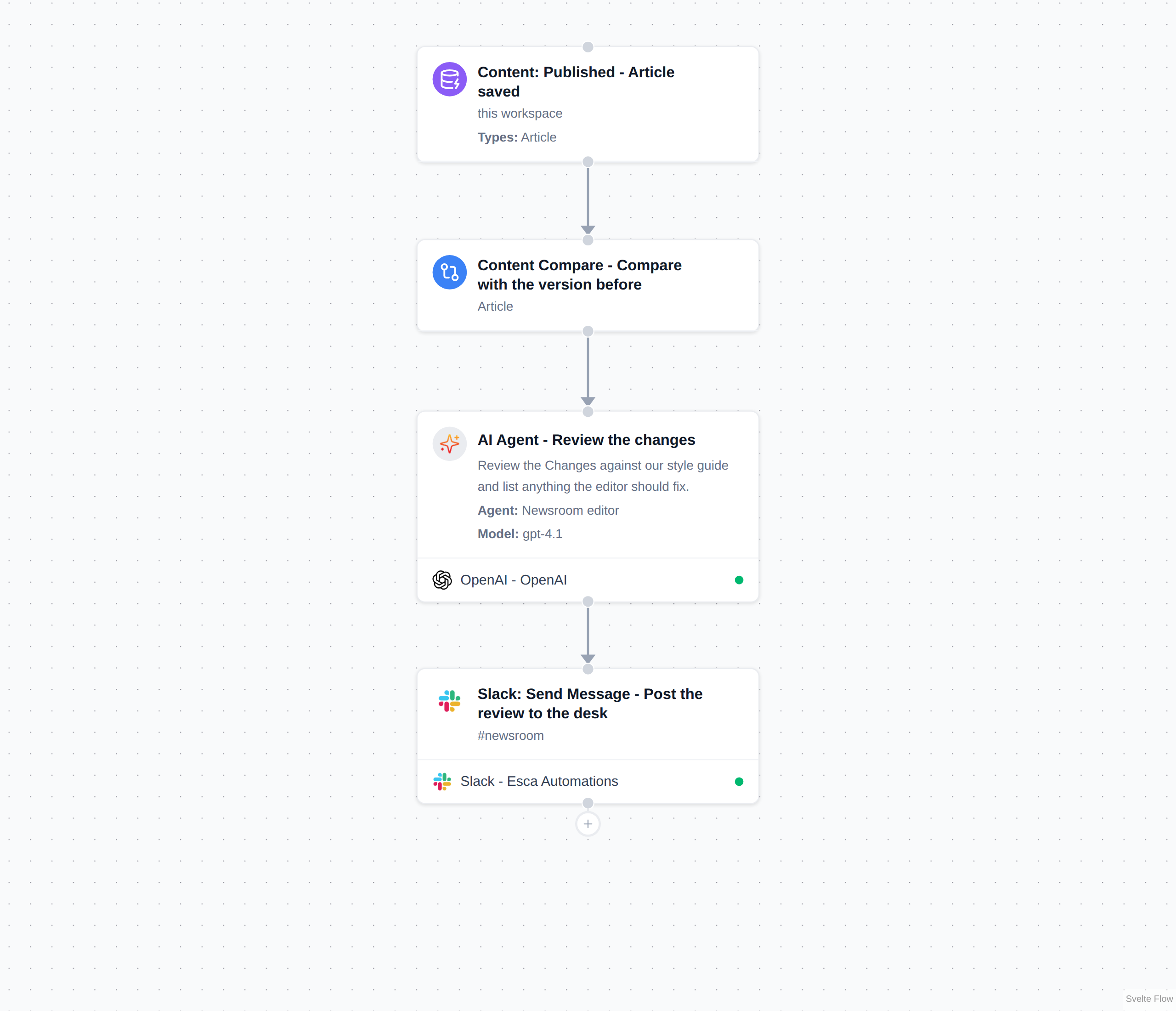
The step reports changes; it doesn't describe them. To summarize them, or review them against a style guide, hand changes to an AI Agent as a context variable, as the flow below does.
A lookup that finds nothing fails the step, since there is nothing to compare. A revision or version of other content is refused, as is a revision of a variation. On a connected CMS the step needs a recent enough server module; with an older one it says which release it needs.