HTTP Request
Calls any web address and hands the response to later steps. Reach for it when a service has no integration of its own: fetching a list of articles to loop over, posting a record to a partner system, or calling an internal API your developers have published.
Fields
| Field | Description |
|---|---|
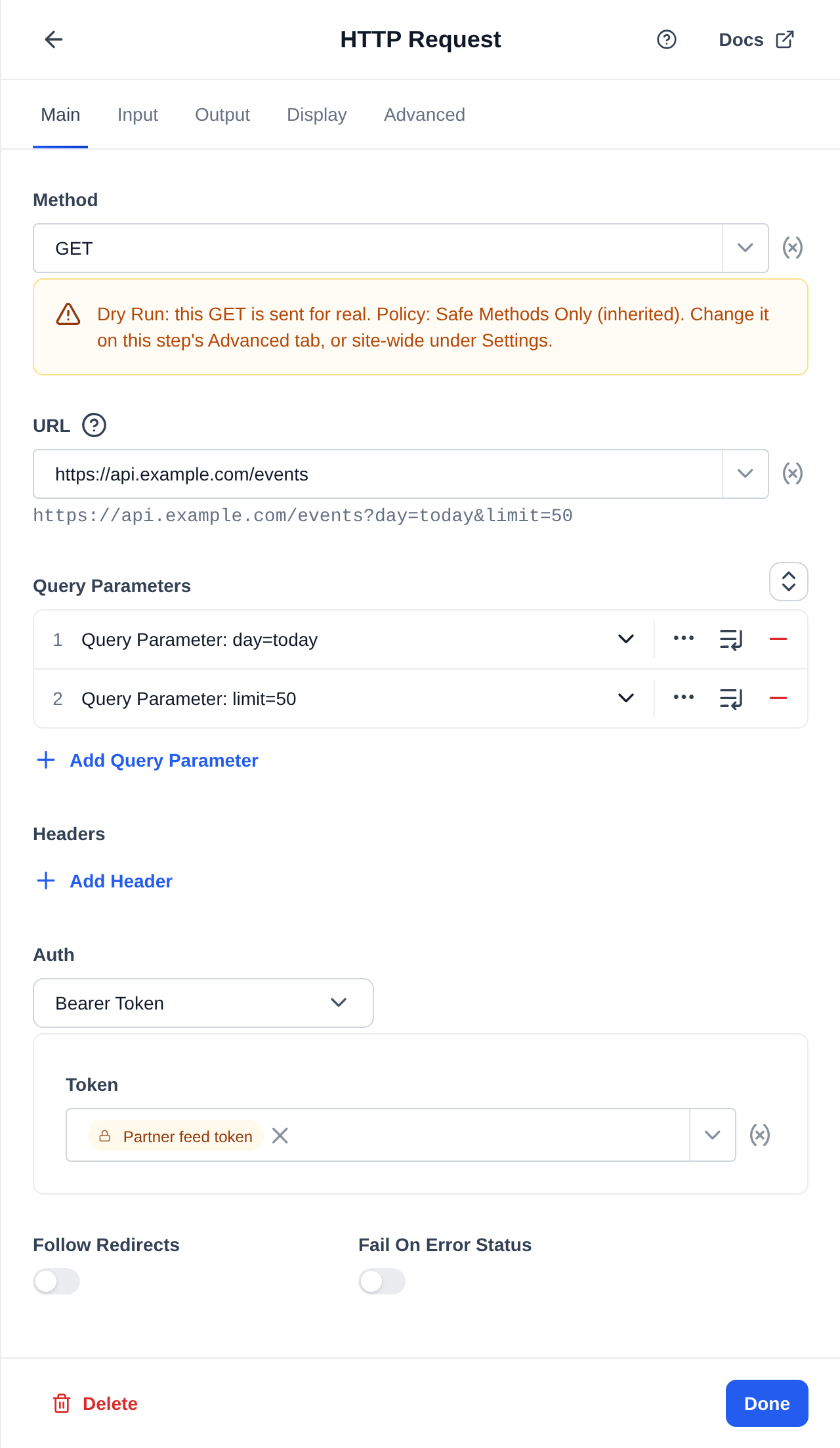
| Method | The HTTP method. Pick GET, POST, PUT, PATCH, DELETE, HEAD or OPTIONS, type another method the server takes, or bind a variable that names one. A method is upper case with no spaces. |
| URL | The address to call. Accepts variables. Once the step has query parameters, a note under the field shows the whole address as it will be sent. Addresses on your own private network are refused; see Limits. |
| Query Parameters | Name and value pairs appended to the address. Each row can be switched off without deleting it. |
| Headers | Request headers, each row switchable the same way. A note under the field lists the headers that are on, apart from those Auth adds. |
| Body | What the request carries, for any method but GET and HEAD. Left unset, a POST, PUT or PATCH is sent with an empty body. See The body. |
| Auth | How the request authenticates: Basic (a username and password), Bearer Token, API Key (a Key Name and Key Value, in a header or the query string), Client Credentials, or Connection, which signs in through a Custom OAuth connection and refreshes its token as needed. A step whose connection is not connected fails without sending anything. |
| Follow Redirects | Whether to follow a redirect to where it points. Off when unset; see the note below. |
| Fail On Error Status | When on, a status outside the 200s fails the step so the flow can take its error path. Off when unset, so the step succeeds and later steps read the status themselves. |
Most tools follow redirects on their own; this step does not unless Follow Redirects is on. With it off, a request to an address that redirects "succeeds" with a 3xx Status and an empty body, and the new address sits in the Location header. Turn it on when you call an address that may move, and turn on Fail On Error Status as well if an unfollowed redirect should count as a failure.
The body
Pick how the body is built from what the service expects.
- Raw
- Form URL-Encoded
- File
- Multipart Form
Text you type, with a Content Type of text, JSON, XML or HTML. Variables are written the way the content type needs: as the text of a JSON string inside quotes, as JSON for a list or object placed outside quotes, and with their markup escaped in HTML or XML, so a value can never change the shape of what is sent. With the Article's headline and tags inserted as variables, a JSON body looks like this before the run fills it in:
1{ "headline": "Article › Headline", "tags": Article › Tags }
Turn on Raw Variables only when a variable already holds JSON or markup you mean to send as written.
A list of name and value Fields, sent the way a web form submits them, such as status=ready&slug=harbor-storm. Right for older APIs and most webhook receivers.
A file from an earlier step, streamed as the whole body with the file's own content type. Right for upload endpoints that take the file itself, such as an image service.
Text Fields and Files together, sent as multipart/form-data. Each file goes under a part Name, with a File Name that defaults to the file's own. Right for attachment endpoints that take a file beside its description.
Files are streamed from storage, so an upload is bounded by the storage, not by memory.
Advanced
| Field | Description |
|---|---|
| Connect Timeout (ms), Read Timeout (ms) | How long to wait to connect, and to read the response. A read timeout longer than the automation's execution budget is flagged, since the run would give up before the request did. |
| Response Destination | How the response body is kept: Discard (status only), Headers Only, Inline (the body travels in the run), Storage (the body is saved as a file), or Automatic, which keeps it inline and saves it as a file when it is too large. Automatic when unset. |
| Inline Response: Max Size and its Unit | The largest body kept inline. 1 MB when unset. |
| Storage Response: Max Size and its Unit | The largest body saved as a file. 10 MB when unset. |
| Dry Run: Outbound HTTP | Which of this step's requests a dry run sends: None, Safe Methods Only or All Methods. Unset, the Settings page's choice applies. |
| Resilience | Optional retries, a per-attempt timeout and a circuit breaker. Empty, a failure is final. |
Resilience in detail
| Field | Description |
|---|---|
| Max Retries | How many times to retry a failed request. Zero turns retrying off. |
| Initial Retry Delay, Backoff Multiplier, Max Retry Delay | How long to wait before each retry, and how fast that wait grows. |
| Jitter | Varies each delay by up to half, so many failing runs don't retry together. |
| Attempt Timeout | Fails one attempt that runs too long, apart from the retry schedule. |
| Enable Circuit Breaker, with a Failure Threshold and Open Duration | After enough failures in a row, requests fail at once for a while instead of piling onto a service that is already struggling. |
Retries survive a restart of the platform, and every attempt is recorded, so the step's history shows the whole sequence rather than the last try.
What later steps see
| Value | Description |
|---|---|
| Status, Status Text | The HTTP status code and its text. |
| Headers | The response headers. |
| Cookies | Any cookies the response set. |
| Body (Raw) | The body as text, when kept inline. |
| Body (JSON) | The body parsed as JSON, when the response is JSON and kept inline. Pick fields from it like any other value. |
| Body (File) | The body saved as a file, when saved to storage: what a later step needs to open it, its Public URL and its Size (bytes). The variable picker shows it as a file. The file is deleted when the run is archived. |
How a saved response file is named
The file is named the way a browser saving it would be: by the server's Content-Disposition header, else by the address's last segment when that is a file name such as report.xlsx, else by an id with the usual extension for its content type. A body the server describes only as application/octet-stream takes its type from that name. A body a browser would open as a page (HTML, SVG or XML) is stored as a plain download under a name that can't open as one, so page.html is stored as page.bin.
Example: fetch a list and loop over it
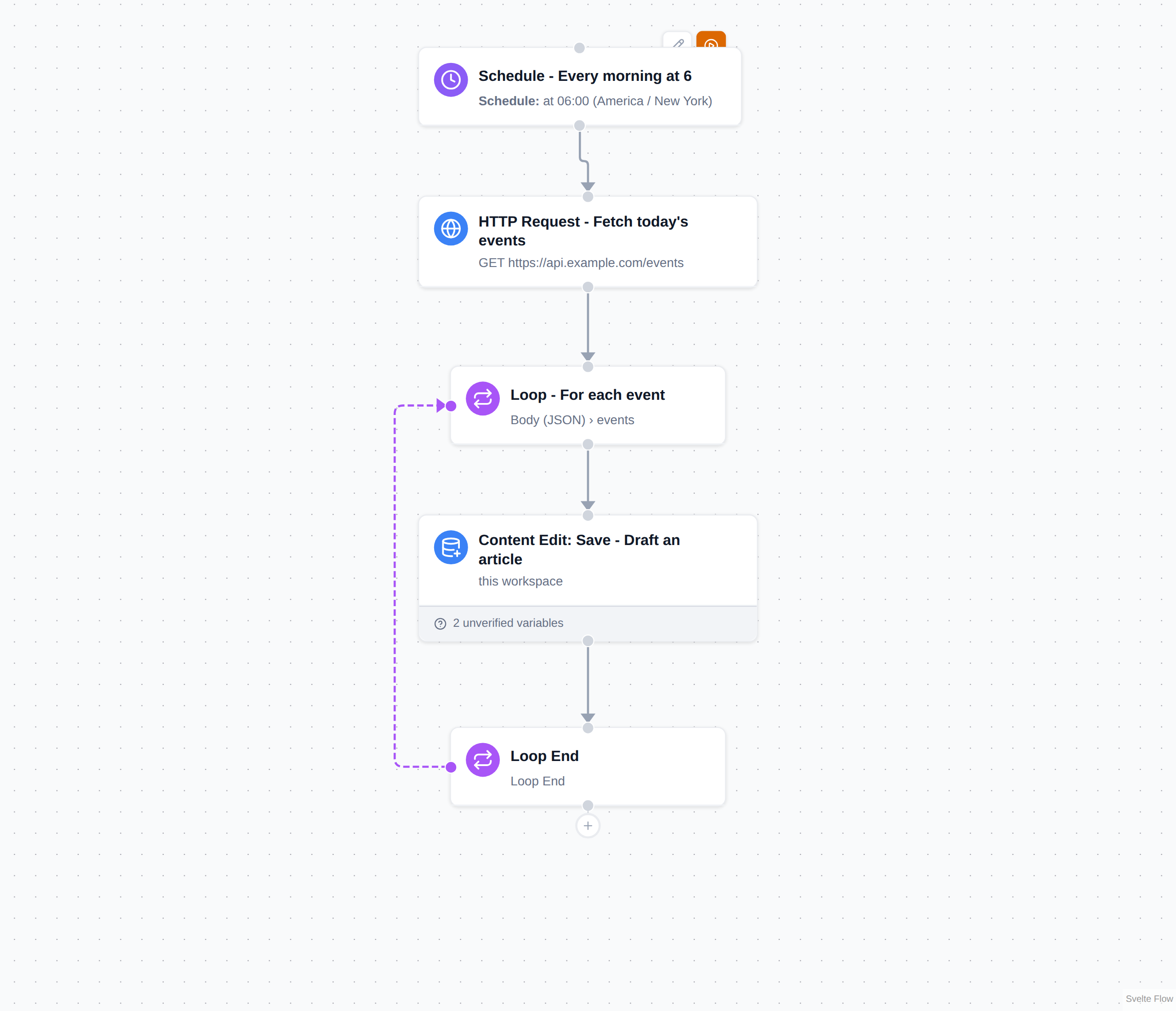
Say a partner publishes the day's events as JSON at https://api.example.com/events?day=today, and you want one article draft per event.
- HTTP Request: Method GET, the address in URL, and the partner's key under Auth as a Bearer Token stored as a secret.
- Loop over the request's Body (JSON) › events.
- Inside the loop, a Content Edit Save that creates an Article from the current item's fields.
During a dry run
A dry run sends this step's request only when the method only reads: GET, HEAD, OPTIONS and TRACE. Any other method is logged with its address and skipped, and the step returns its Test Output instead. Dry Run: Outbound HTTP on the Advanced tab changes that for this step alone. For the policy itself, and how to set it for the whole workspace, see Outbound HTTP during a dry run.
Limits
HTTP Request can't reach services on your own private network, such as an internal server or anything at localhost, unless the platform operator has allowed local network requests for the whole deployment. The check applies to every address a request reaches, including a public address that redirects to a private one. Ask your developers to publish the service at a public address, or the platform operator to allow local requests.