Slack trigger
Starts the automation when someone in Slack uses one of your Slack app's slash commands or shortcuts, or mentions the app. In the trigger picker it is Slack, under Integration Triggers.
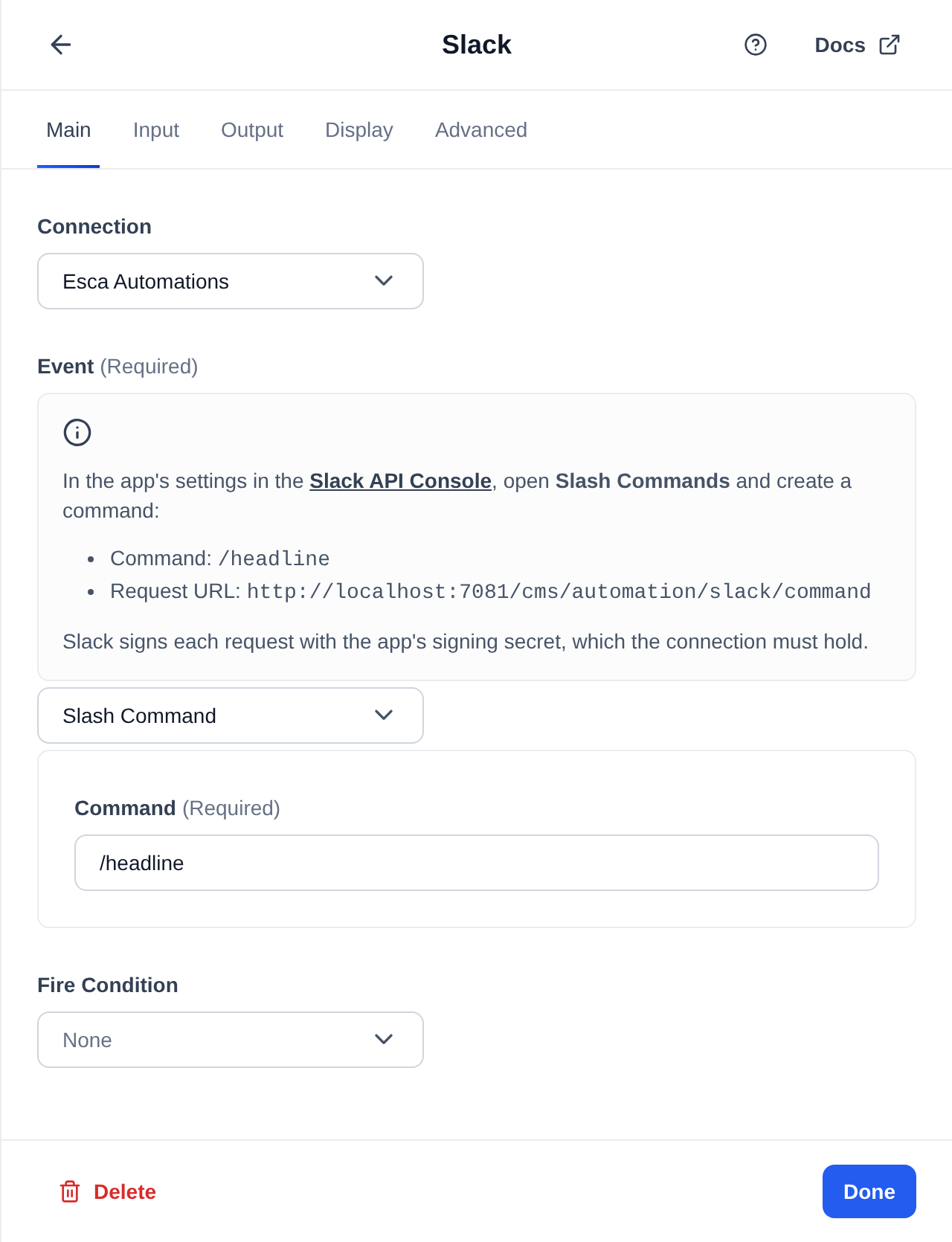
Fields
| Field | Required | Description |
|---|---|---|
| Connection | Yes | The Slack connection whose app defines the command or shortcut, or is mentioned. |
| Event | Yes | What in Slack fires the trigger. |
Events
| Event | Fires when | Its own fields |
|---|---|---|
| Slash Command | Someone uses the command. | Command: the command as the Slack app defines it, such as /weather. Case and the leading slash don't matter. |
| Global Shortcut | Someone picks the shortcut from Slack's shortcut menu or search. | Callback ID: the shortcut's Callback ID as the Slack app defines it, such as open_ticket. |
| Message Shortcut | Someone picks the shortcut from a message's More actions menu. | Callback ID: as for a global shortcut. |
| App Mention | Someone mentions the app by its @name in a channel or thread the app is in. | None. |
Setting it up in Slack
Slack learns about a command, shortcut or mention only from the app's own settings. The trigger shows the exact values to enter once its Command or Callback ID is filled in, or at once for a mention, and the steps are under Commands, shortcuts and mentions on the connection page.
Slack signs every request with the app's signing secret, and the trigger runs only for a request that verifies against it, so the Slack connection must hold the Signing Secret. A request that fails verification, or that arrives more than five minutes after Slack signed it, starts nothing. Several automations can listen for the same command, shortcut or mention, and each runs; a trigger only hears requests from the workspace its connection is installed in.
The app hears only mentions in conversations it is in; Slack offers to invite it when someone mentions it anywhere else. A message in a direct message with the app isn't a mention, even one that names it. A mention by a bot, including the app's own replies, starts nothing, so a reply that mentions the app can't start the automation again. Slack sends a mention again when it hasn't heard back within 3 seconds; one it sends again doesn't run the automation twice.
Output
The output of a slash command or shortcut names who used it, in user.id and user.name, and the workspace, in team.id and team.domain, and carries Slack's trigger_id for opening a modal. The trigger_id expires 3 seconds after the request, and the automation runs after the request has been acknowledged, so a run may be too late to use it.
| Event | Its own output |
|---|---|
| Slash Command | command, the command used; text, what was typed after it, empty when nothing was; channel.id and channel.name, where it was used; response_url. |
| Global Shortcut | callback_id. |
| Message Shortcut | callback_id; channel.id and channel.name; message, the message the shortcut was used on, with its text, its author's id in user, its ts, and its thread_ts when it is a reply in a thread; response_url. |
| App Mention | See below. There is no trigger_id or response_url. |
An App Mention's output:
text: what was said, as Slack sends it. Every mention in it, the app's own included, is written as<@followed by the person's user id and>, such as<@U0LAN0Z89>.user.id,channel.idandteam.id: who said it and where. Slack sends no names with a mention.ts: the mention's own timestamp.thread_ts: the thread to reply in. The thread the mention is in, or the mention itself when it isn't in one.bot_user_id: the app's own user id, which marks the app's mentions intextand its own messages in a thread.
Replying
The request is acknowledged at once and nothing shows in Slack, so the reply is the automation's to send:
- Use the Slack action's Respond, which replies through
response_urlto only the person who used the command or shortcut, or to the whole channel, up to five times within 30 minutes. - Use the Slack action's Send Message to post to
channel.idoruser.id. A global shortcut has no channel orresponse_url, so this is how one replies. - Answer a mention with Send Message to
channel.id, with Reply in Thread set tothread_ts. The answer sits under the question, where the conversation can go on.
A chat assistant
A mention makes a natural assistant: the question stays in the channel, the answer arrives in its thread, and each later mention in the thread brings the conversation so far.
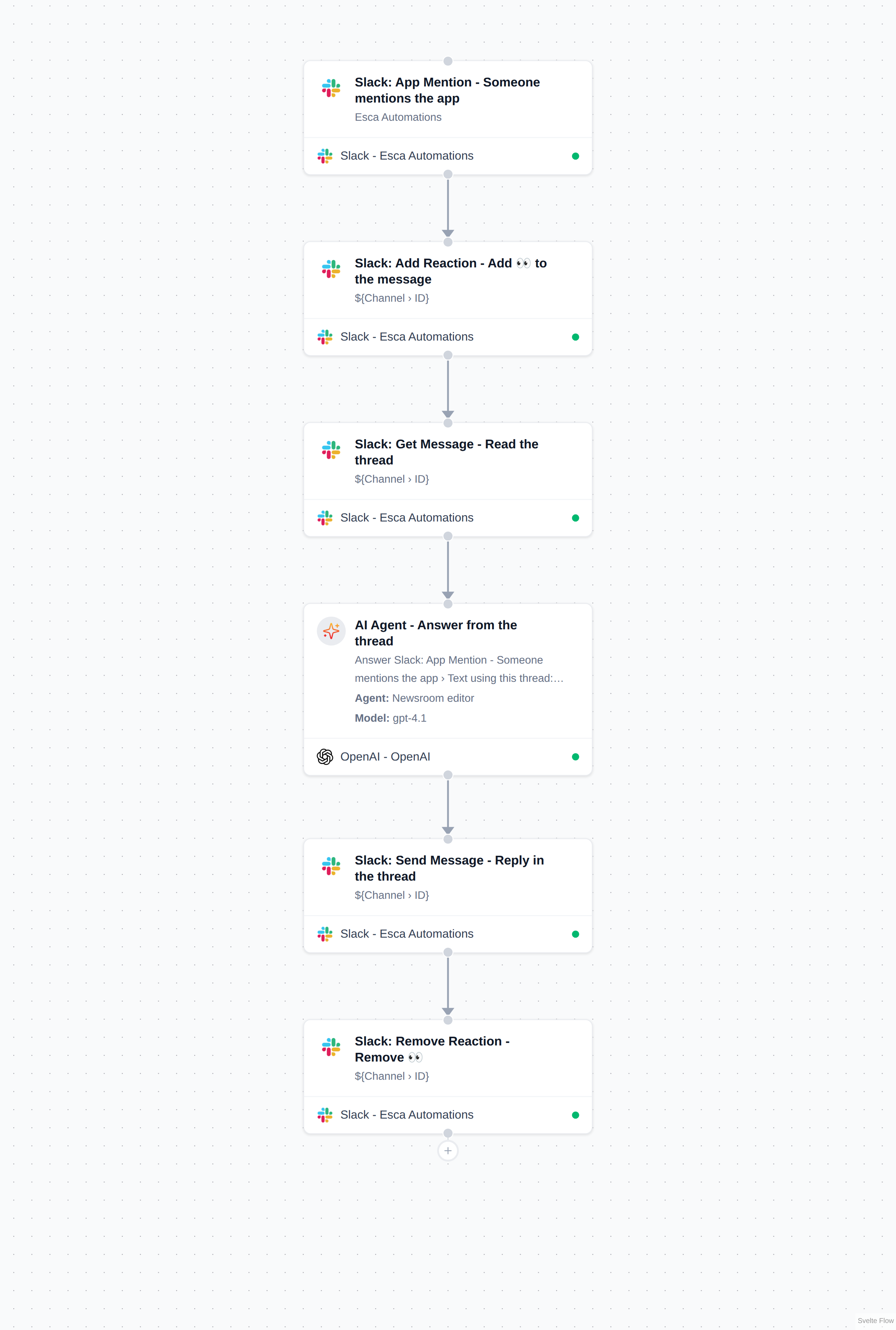
Tell the AI step that it is <@bot_user_id>, with the variable in place of bot_user_id, so that it knows which mentions are of itself and which messages in the thread are its own earlier answers. Since people appear as <@ and their id >, it can mention someone back the same way.
Deliveries
Every request the trigger receives is recorded on its Deliveries screen, from which it can be replayed as a real run; a replay is signed afresh, so it verifies like the original did. See Deliveries.